
|
| Home |
| F.A.Q |
| EULA |
End-User License Agreement [EULA]
uDiscMounter
IMPORTANT — READ CAREFULLY
This End User License Agreement (EULA) is a legal agreement between YOU (individual or entity) and Ari Project for the uDiscMounter software,
including the computer program, electronic materials, and related documentation (“SOFTWARE PRODUCT”).
By installing, copying, or using the SOFTWARE PRODUCT, YOU AGREE to be bound by the terms of this EULA. If you do not agree to these terms, do not install or use the SOFTWARE PRODUCT.
1. COPYRIGHT & OWNERSHIP
The SOFTWARE PRODUCT is protected by copyright laws and international treaties.
It is licensed, not sold. All ownership rights remain with Ari Project.
2. RESTRICTIONS
You MUST NOT:
- rent, lease, or loan the SOFTWARE PRODUCT;
- sell, modify, decompile, disassemble, or reverse engineer it;
- redistribute or publish it without written permission from Ari Project.
You may permanently transfer your license if:
- You keep no copies of the SOFTWARE PRODUCT;
- You transfer the entire SOFTWARE PRODUCT and this EULA;
- The recipient agrees to the terms of this EULA.
Any violation of these terms will result in immediate termination of this license.
3. GRANT OF LICENSE
You are permitted to install and use the SOFTWARE PRODUCT on unlimited computers, both at home and at the office, as long as all usage complies with this EULA.
4. DISCLAIMER OF WARRANTY
Ari Project strives to keep the SOFTWARE PRODUCT as bug-free as possible, but no software is completely free of errors.
We DO NOT WARRANT that the SOFTWARE PRODUCT will run in every environment, on all Windows-compatible systems, or alongside all other applications.
The SOFTWARE PRODUCT is provided “AS IS” without any warranties of any kind.
5. LIMITATION OF LIABILITY
In no event shall Ari Project or its suppliers be liable for any:
- indirect, incidental, special, or consequential damages;
- loss of data, loss of business profits, business interruption, or any other financial loss arising from the use of or inability to use the SOFTWARE PRODUCT.
You should evaluate the SOFTWARE PRODUCT using non-critical data. Error reports are welcome, but there is no guarantee that any error can or will be fixed.
Thank you for using and supporting uDiscMounter.
Ari Project
uDiscMounter Team
| Download Link | ||
| Download uDiscMounter 25.1 | ||
| Download | x64 x86 | 713 Kb |
| Support Windows Vista/7/8/8.1/10/11 | ||
| Support udiscmounter@gmail.com |
| How to Open/Add Files | |
 |
Drag & Drop |
 |
Keyboard (CTRL + O) |
| How to Add Virtual Drives | |
 |
|
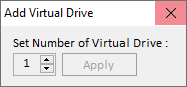
| 1. | Click <Add Virtual Drive> |
| 2. | Select number of virtual drive. |
| 3. | Click Apply |
| 4. | Restart your computer |
| Donate | |
 |
Buy me a coffee |
Copyright (c) 2015 - 2025 Ari Project. All Rights Reserved.